PRODUCT.DETAIL
2026.10.13
ALL PRODUCTS
PRD-001
COMING SOON
GRIDDY
WINDOW MANAGEMENT FOR MACOS
Inspired by FancyZones from Windows, Griddy brings customizable window snapping zones to macOS. Create your own layouts and snap windows with precision using keyboard shortcuts or drag and drop.
MACOS.13+×NATIVE.SWIFT×ONE.TIME
PRICING.DETAILS
ONE-TIME PURCHASE
$14.99
Includes lifetime updates
SECURE.CHECKOUT
VERIFIED
02
Product Showcase
VISUAL.GALLERY×6.ITEMS
PRODUCT.GALLERY
IMAGE.01/06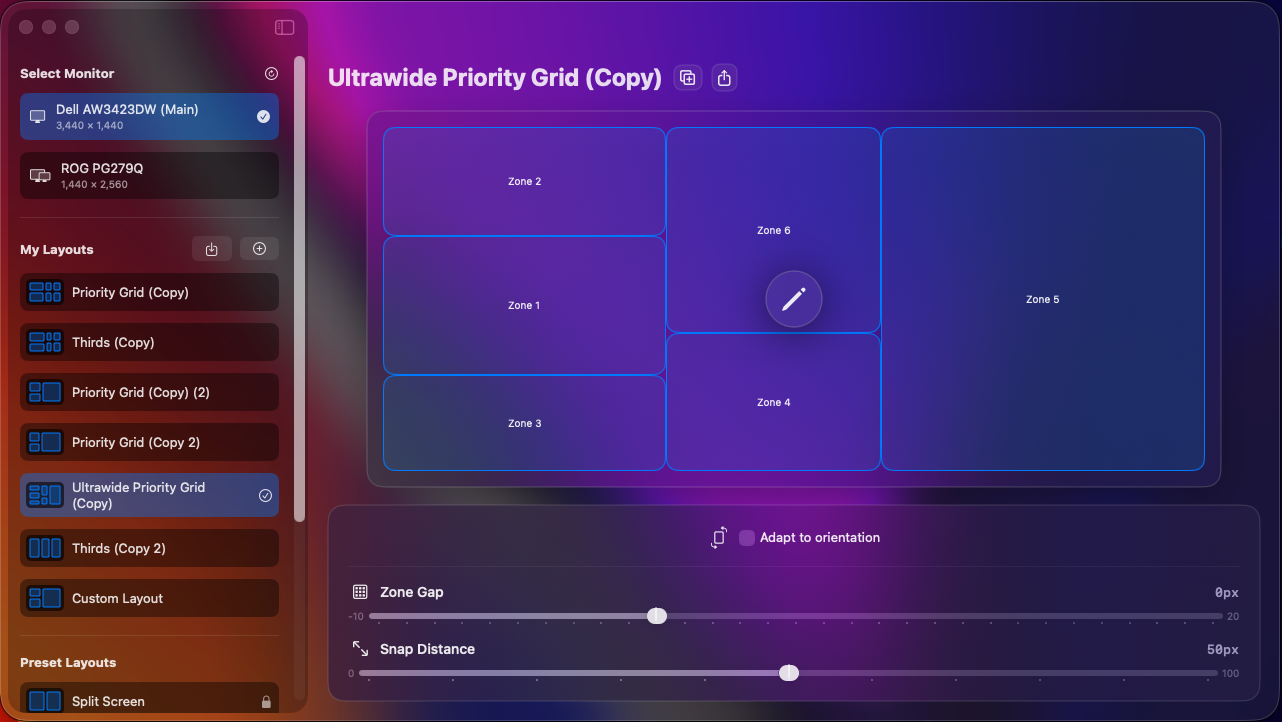
VISUAL.REFERENCE
VERIFIED
SHOWCASE.DETAILS
VIEW.01CURRENT.VIEW
LAYOUT MANAGER
HIGHLIGHTS
- 01Per-display layout profiles
- 02Sane preset layouts
- 03Snap distance control
- 04Zone gap control
- 05Import/Export + Duplication
- 06Adaptive orientations to match monitor aspect ratio
PRO.TIP
Press a secondary mouse button or ⌥ while dragging to snap to zones
FEATURE.PREVIEW
03
Features
CAPABILITIES.INDEX×4.ITEMS
01/04
CUSTOM GRID LAYOUTS
Design your own window zones that fit your workflow. Create layouts for coding, design, writing, or any task.
02/04
KEYBOARD SHORTCUTS
Snap windows instantly with customizable keyboard shortcuts. No mouse required.
03/04
MULTI-MONITOR SUPPORT
Different layouts for each monitor. Griddy remembers your preferences across displays.
04/04
NATIVE PERFORMANCE
Built with Swift and AppKit for seamless macOS integration and minimal resource usage.
04
Requirements
SYSTEM.SPECS
- REQ.01macOS 13 Ventura or later
- REQ.02Accessibility permissions (for window management)